Media & UGC Suite
Four years as sole designer on the tools families use to get their history into Ancestry — record it, scan it, transcribe it, enhance it, or ask family for it.
- ROLE
- Sole designer — media & UGC tools
- TIMELINE
- 2021 – 2025
- PLATFORMS
- iOS · Android · Web
- COMPANY
- Ancestry
At a glance
- Role: Sole designer across the suite, partnered closely with product
- Timeline: An accumulation of shipped projects, roughly 2021 – 2025
- Platforms: Capture tools on iOS and Android; transcription, enhancement, and sharing reaching web too
- One patent application — named inventor, for the multi-page media format
History isn’t only the past
Ancestry has always accepted your old family photos — if you owned a scanner, and if you did the work of digitizing them yourself. That framing quietly limits family history twice. Photos are only one kind of media a family has. And “old” is only one kind of family history.
The idea behind this body of work: you can capture your family history now. Your living relatives know stories you’ve never heard, and the phone in your pocket is a scanner, a camera, and a recording studio. There was no longer any reason for contributing your family’s memories to be difficult or time-consuming.
There’s a second reason this mattered, and it’s the one I find most compelling. Ancestry’s record collections run deep for western Europe and North America — and thin for most of the rest of the world. For families from everywhere else, their own media is the way to a meaningful experience on the platform. These tools were how we said: your photos, your voices, and your documents are every bit as much family history as a census page or a birth certificate.
Not a roadmap — a chain reaction
This suite was never one big planned program. It was an accumulation of ideas my product partner and I put forward, where each shipped feature exposed the need for the next. Audio recording created the appetite for transcription. Our photo scanner was bad at documents, so we built a document scanner. Scanned documents made PDF’s limits obvious, so we invented a new format. Every new capability raised the question of how people would find it. One thing led naturally to another — and by the end, it added up to a genuinely good suite of tools.
Record it — audio
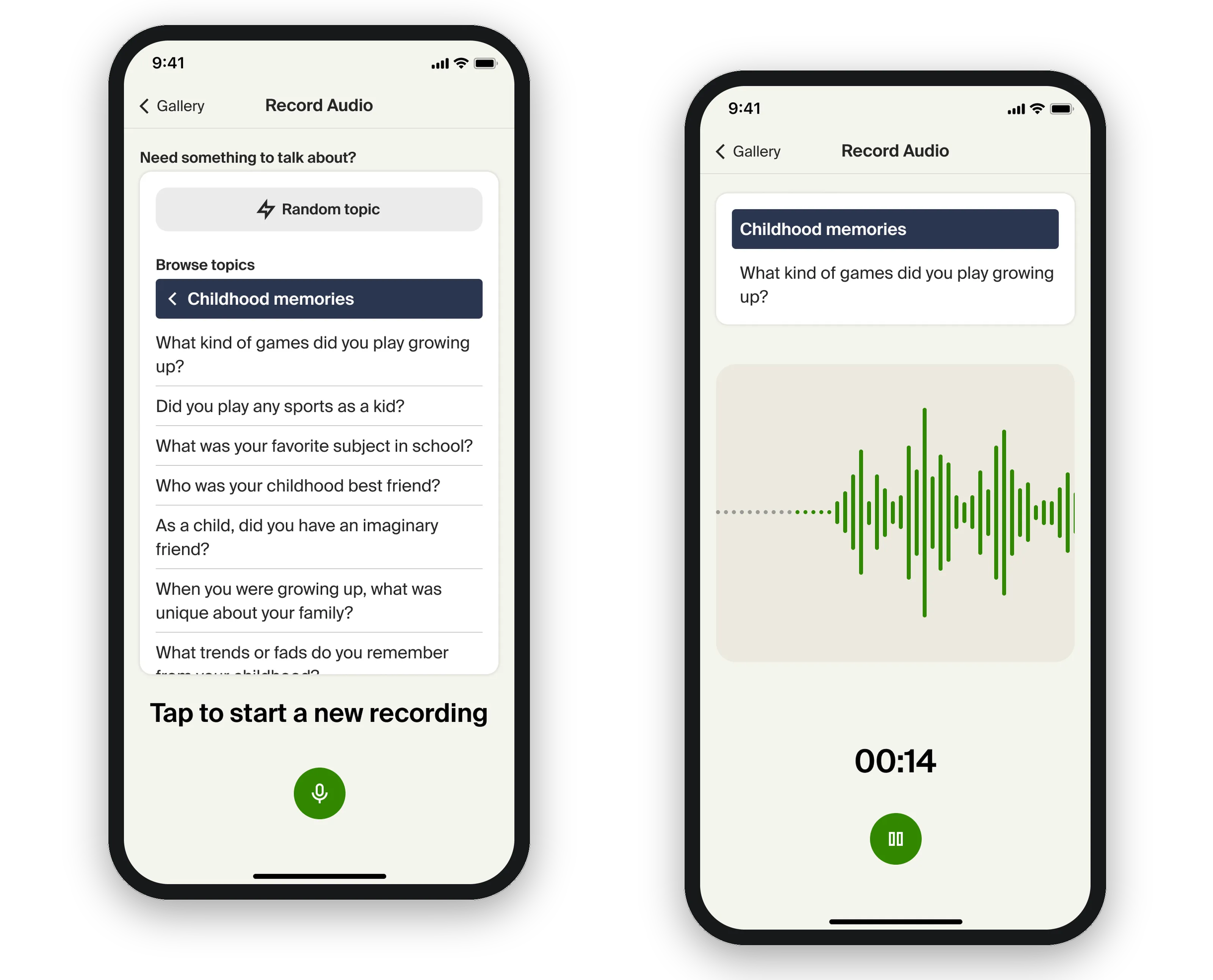
The first piece. We wanted to build a full interview platform, but that would have required buy-in from more teams than our priority could command. So we bootstrapped: a stand-alone, free-form audio recorder we could ship ourselves.
The first thing we learned was that a blank slate overwhelms people. Handed an open microphone and a relative, users froze. So we added a list of prompts to start the conversation — “Did you play sports as a kid?” “What’s your favorite holiday tradition?” — questions you could ask a relative or answer yourself. Small feature, big unlock: the conversation just needed a first sentence.
Once the recorder was out, we kept going: automatic transcription of recordings, and the ability to link an audio recording to a photo — a relative describing what’s happening in the picture, or a recording captured at the event itself.
Scan it — documents
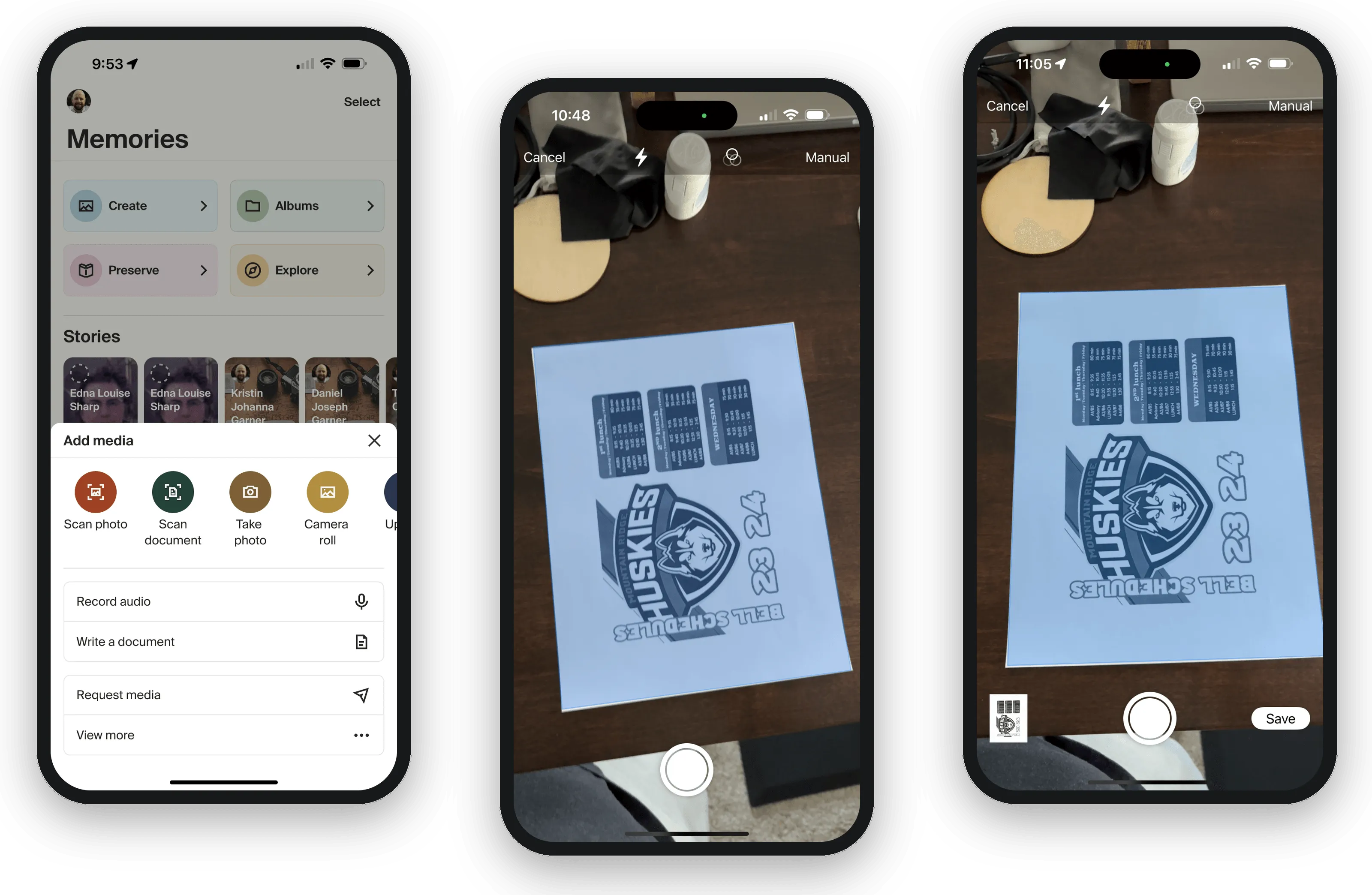
By the time we built the document scanner, iOS and Android both had robust native scanning APIs — edge detection and all — so we built on top of those, keeping the cost down and letting each platform do what it does best.
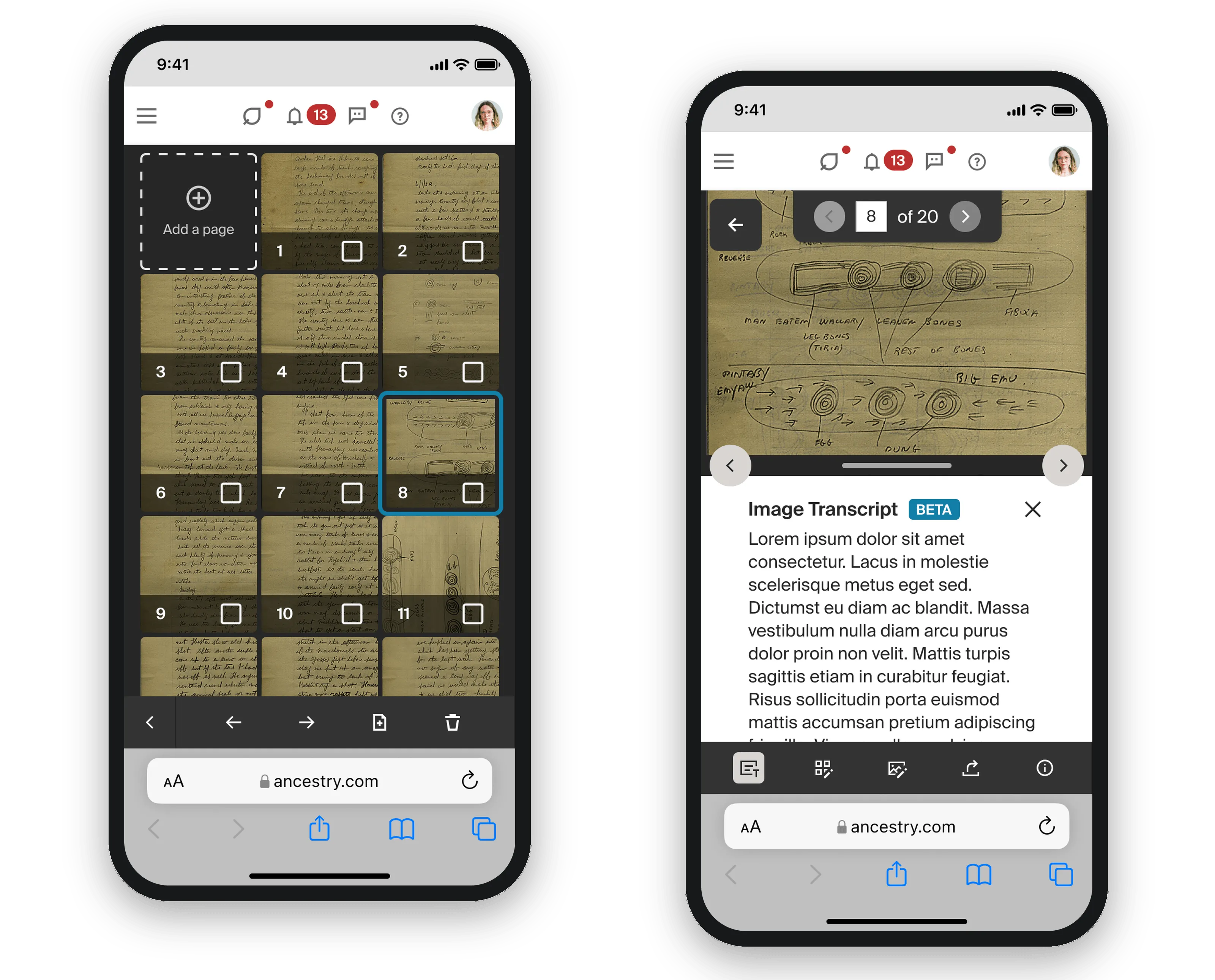
The real design problem wasn’t the scanning. Our earlier photo scanner (built on a third-party SDK) saved every capture as its own image — fine for a shoebox of photos, wrong for a letter or a journal. Scan a twelve-page letter that way and you get twelve separate items cluttering your gallery. That’s not what anyone wants. The letter should be one item that contains its pages.
One letter, one item — multi-page media
That insight became a format. Multi-page media is a container format we created that groups other media into a single item in the gallery. The immediate trigger was technical: the transcription models we wanted to use couldn’t read PDFs, and PDF’s own compression can degrade image quality. But the deeper win was the model itself — pages stay individual, full-quality images; the item is the document.
Then we discovered the container was good for far more than documents. It could hold mixed media — the audio-linked photos from earlier ride on it. It could represent the front and back of a photograph as one item. It even offered a path to attack duplicate media, a major issue on Ancestry’s platform. Each of these presents as its own media type in the gallery, all sharing one framework underneath.
Ancestry applied for a patent on multi-page media, and I’m a named inventor. At the time I left, the multi-page document version was live on the site, with the other formats in various stages of development.
PATENT: happy with “applied for a patent… named inventor”? If you know the application’s current status (or want it vaguer), adjust here.
Read it — transcription
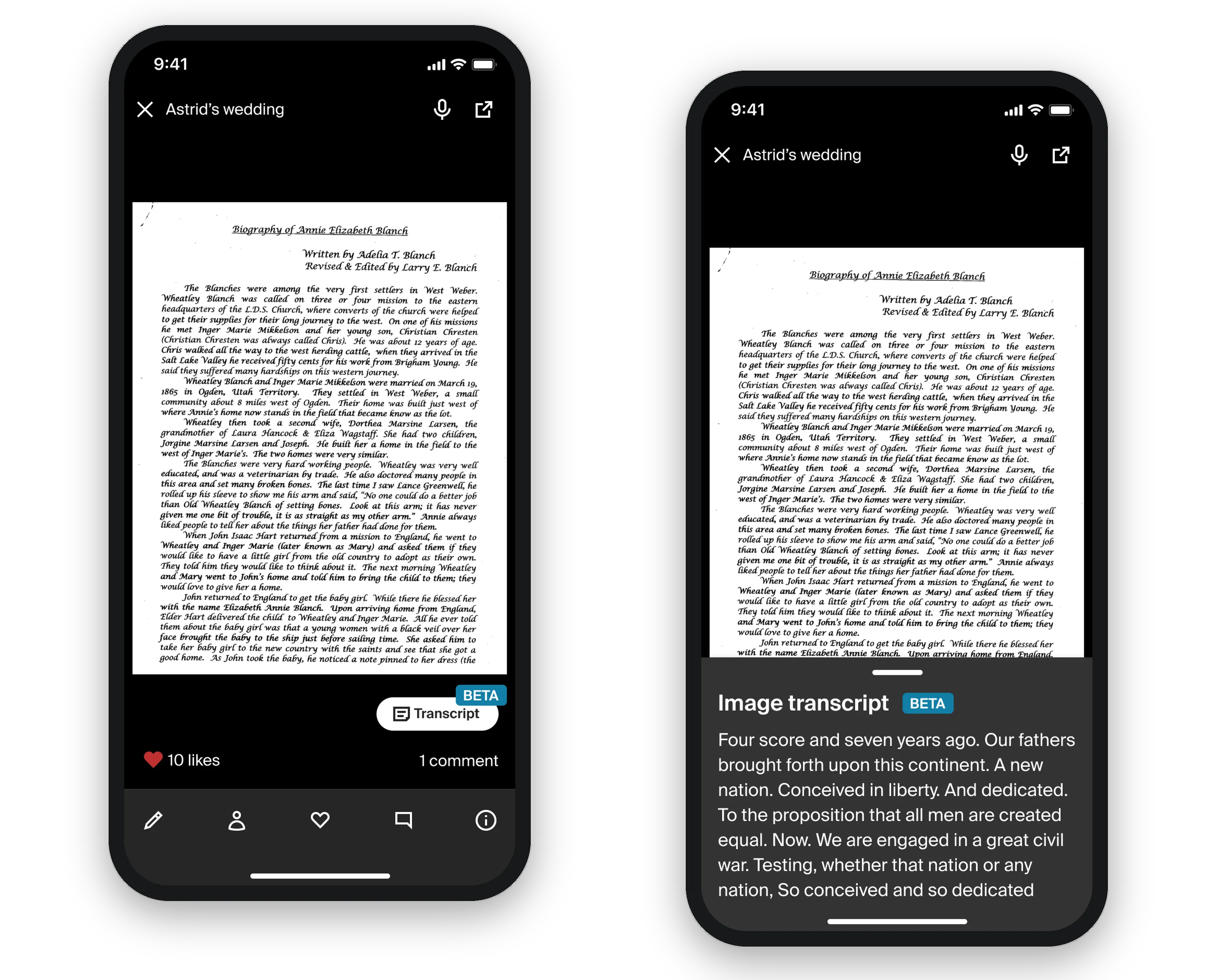
Audio transcription was the easy half — by then, the technology was well established. Handwriting was the hard half. Image transcription became possible when Ancestry developed a model that could read older styles of writing, proven first on large record collections like the 1950 U.S. census. Once it had earned its keep there, we brought it to your own media — by which we really meant documents: that scanned letter, that journal.
The experience is deliberately simple: if an image is eligible, you tap a button and we generate the transcription. The payoff is twofold — Grandma’s handwriting becomes readable, and it becomes searchable. (Editing a generated transcription stayed on the roadmap the whole time I was there; it kept losing the priority fight and never got built.)
Restore it — Enhance
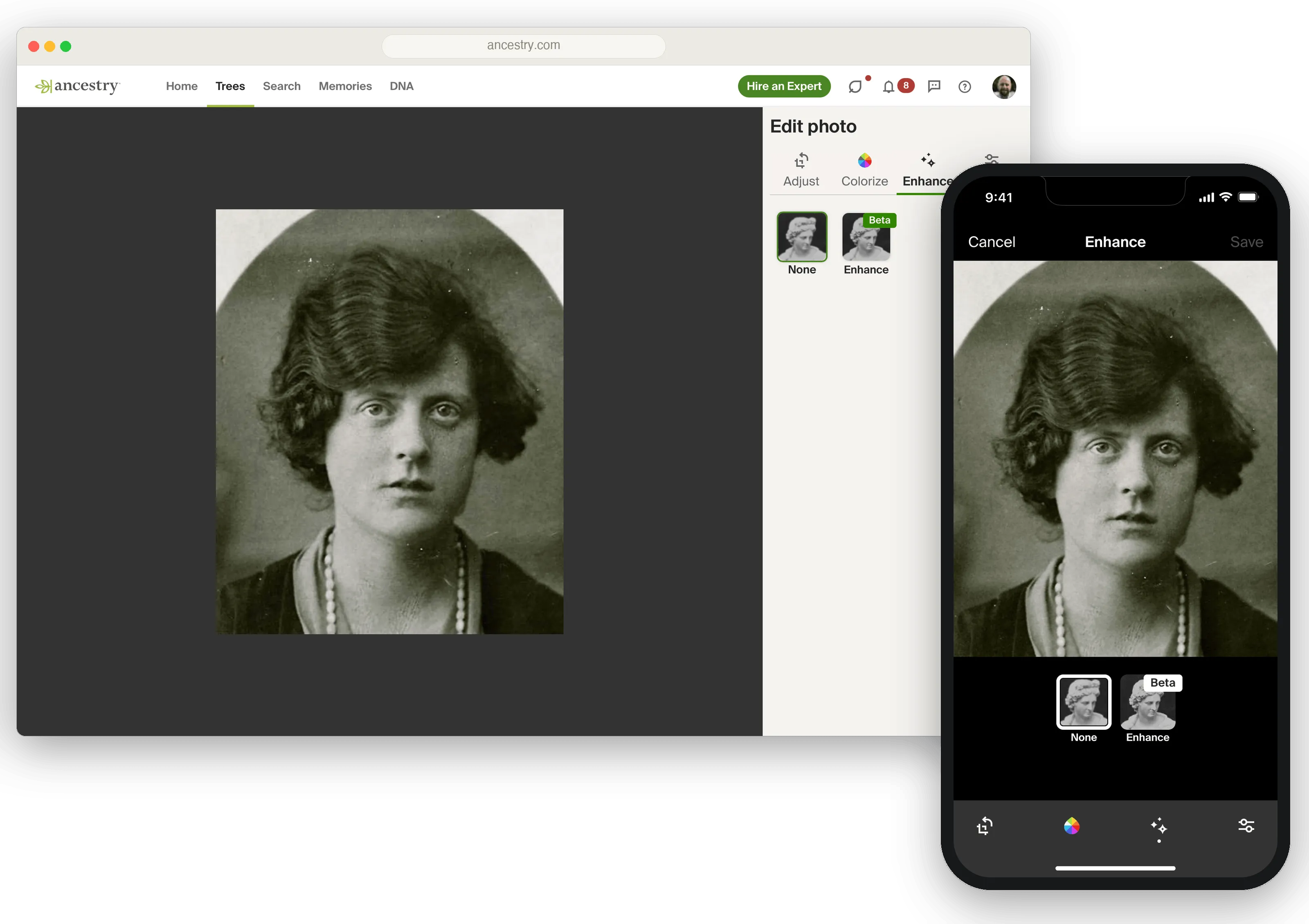
Ancestry had shipped colorization for old photos a while earlier. Our data science team then built a model that did several jobs in one pass: upscaling, sharpening, and light restoration — removing dust and small scratches.
What made this more than a nice-to-have: Ancestry’s platform is full of photos uploaded many years ago, under the tight resolution and file-size limits of that era. Enhance repaired some of the platform’s own history — a genuinely better version of your photo, without adding anything you might not want. (Colorization can be polarizing; we deliberately left it a separate choice.) We tested several models head to head before launching ours.
Make it findable — awareness and the media drawer
Building the tools is half the job; nobody benefits from a scanner they never find. Two efforts tackled this, two sides of the same coin.
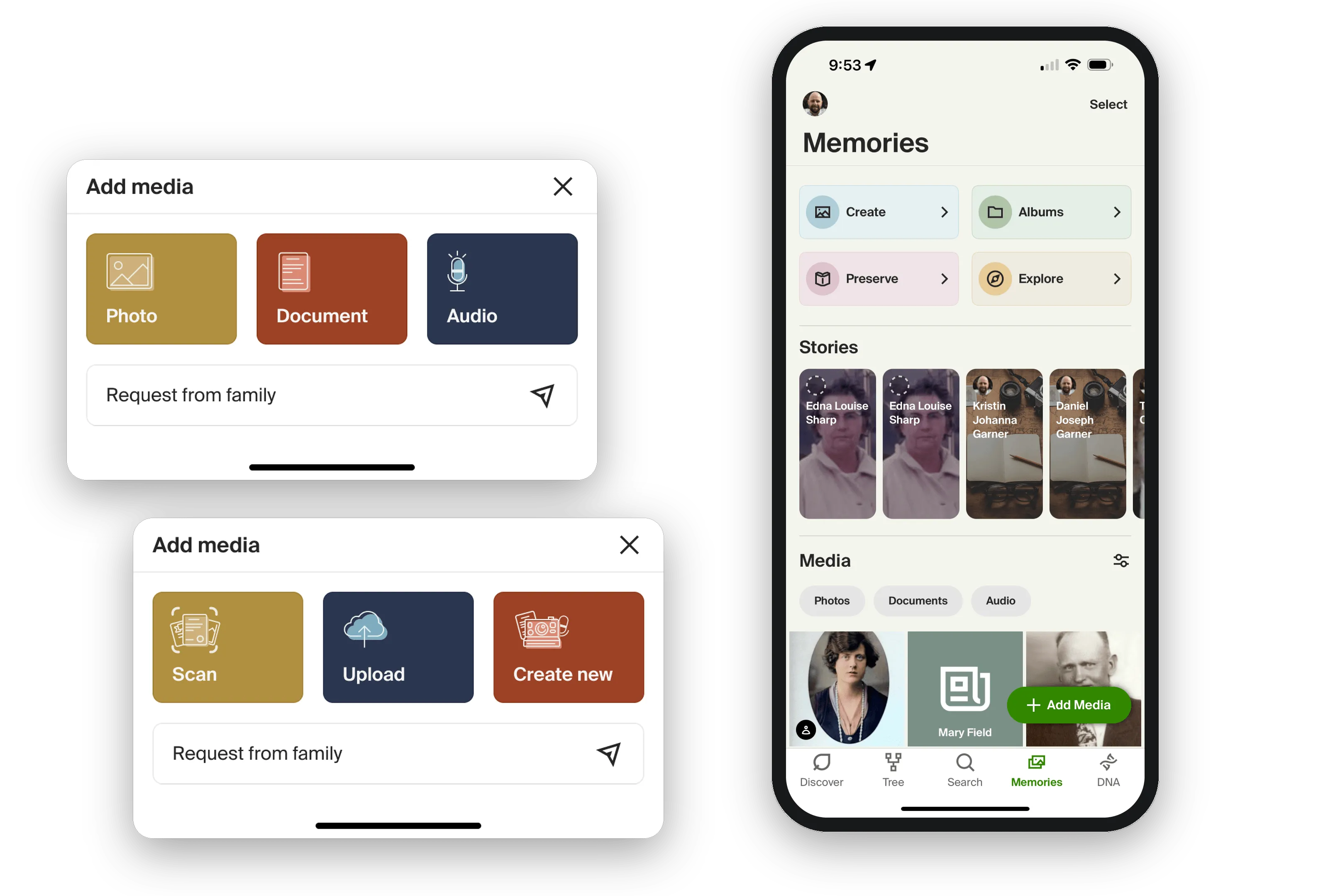
Tool awareness was about educating users that these features exist without turning the product into a sales pitch. And the media drawer was about the moment of intent: the app has one big “+” button for adding media, but behind it hide many verbs — upload, take a photo, scan a photo, scan a document, record audio, and on and on. The work was designing a quick flow that gets you to the right tool without drowning you in choices.
Ask the family — Request Media
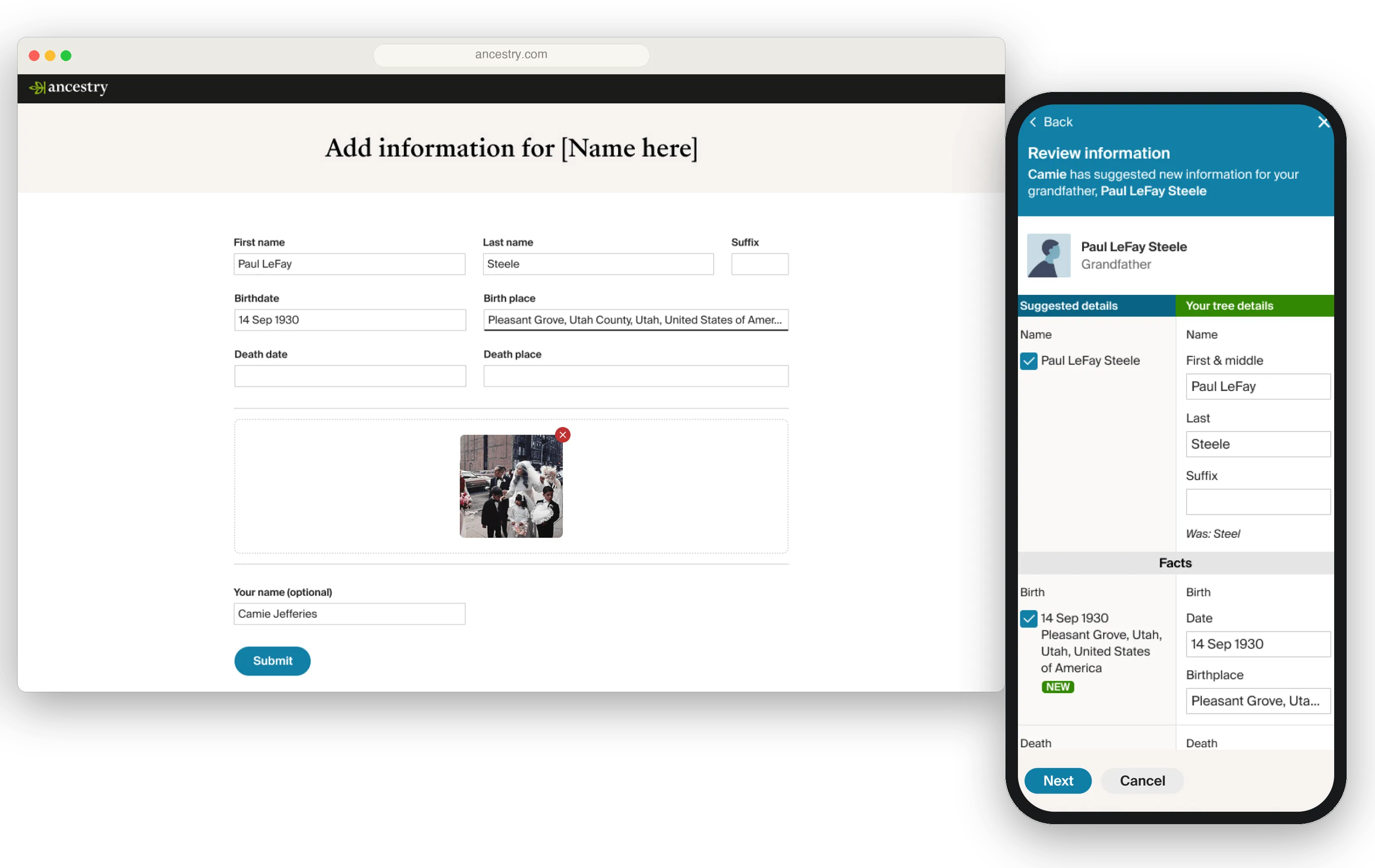
Some ideas just need to wait for their moment. I pitched Request Media roughly eight years before it shipped; back then it never got enough legs. When it came back around, it filled the one gap the rest of the suite couldn’t: the media you don’t have. You send a request to a family member — or anyone who might have what you’re looking for — and they get a link to a page where they can upload media directly to your tree, or answer questions about an ancestor you’re researching. The rest of the suite makes you the digitizer; this one turns your whole family into the source.
The bet that didn’t stick — a modernized viewer
Every one of these tools eventually lands in the same place: the viewer. And as we layered in transcriptions, linked audio, and multi-page documents, it became clear the existing viewer paradigm was working against us — each addition made the UI more crowded, and the most important functions weren’t getting the prominence they deserved. So I designed a new framework for the viewer: modernized, with room to add functionality cleanly and up-level what mattered most.
Full disclosure: we launched it as a test, and a few metrics came back worse than the old version. So we rolled it back. I still believe that with more time for users to learn the new patterns it would have outperformed the old UI — but the results arrived just as the team’s focus shifted to AncestryPreserve, so we shelved it. Not every bet lands. This one’s in the case study anyway, because the reasoning was right even where the outcome wasn’t.
Outcome
Between 2021 and 2025, “adding your family’s history to Ancestry” went from upload the photos you’ve already scanned to: record your grandmother answering a question about her childhood, scan the twelve-page letter as one document and make its handwriting searchable, restore the photo you uploaded fifteen years ago, and request the media you’re missing from the cousin who has it.
This work fed a larger company-wide push to dramatically grow user contributions — one that many teams advanced, and that AncestryPreserve would carry forward next. I won’t claim the suite caused what came after; it’s more honest to say it was one evolution of that push, and Preserve was the next one.
Reflection
What I loved about this period was the autonomy. These weren’t projects handed down from a roadmap — they were ideas my product partner and I put forward because we believed they’d genuinely help users, and we were trusted to pursue them.
Rarer still: we got to finish things. The usual pattern is that v1 ships and you’re immediately handed the next priority project — and the features cut for scope, the ones slated for v2, never get built. Here, we got to go back: the prompts after the recorder, the transcription after the scanner, the photo-linking, the formats beyond the document. That’s why this reads as a suite and not a pile of features — the tools compound, because we stayed with the problem long enough to let them.